Security teams need tools that help them move faster, work more efficiently, and adapt to evolving operational requirements. The latest Arcules enhancements introduce new capabilities that strengthen privacy protection, extend investigations beyond the security desk, improve vehicle intelligence, increase video reliability, simplify Camera to Cloud deployments, and deliver a smoother experience when working across the broader Milestone ecosystem. Together, these enhancements help organizations get more value from their video security investments while improving the efficiency of everyday operations.
Protecting privacy should not come at the expense of investigative effectiveness. Selective Blur—enabled by Milestone's BrighterAI technology—lets you blur faces or license plates directly within exported video while preserving the surrounding context needed to understand an event. Unlike broad redaction methods that obscure large portions of footage, privacy protection can be applied only where necessary. This helps organizations share video more confidently with customers, partners, law enforcement, and other stakeholders while maintaining the evidentiary value of recordings. The result is a more flexible approach to evidence sharing that supports privacy requirements without limiting investigative workflows.

Investigations do not always happen from a workstation. By extending forensic search capabilities to the Arcules iOS application, security teams can quickly locate relevant video footage while in the field, responding to incidents, or managing operations remotely. Familiar AI-powered search workflows are now available on mobile devices, allowing operators to verify events and identify footage from virtually anywhere. Whether responding to an active situation or reviewing historical video, mobile access to forensic search helps organizations investigate faster and make more informed decisions when every minute matters.
Vehicle activity often plays an important role in security investigations and operational workflows. Axis License Plate Recognition enables organizations to automatically identify vehicles and search video using license plate data across both Camera to Cloud and gateway-connected environments. By transforming vehicle information into searchable intelligence, security teams can quickly locate vehicles of interest, reduce manual video review, and accelerate investigations. The expansion to both deployment models provides greater flexibility while helping organizations improve situational awareness across parking areas, entry points, campuses, and other monitored locations.
Learn more about license plate recognition for Camera to Cloud and gateways
Reliable video evidence is critical when reviewing incidents and responding to security events. Secondary Stream Recording helps improve recording resilience by leveraging an additional video stream, increasing the likelihood that important footage is retained when disruptions occur. This added layer of protection can help organizations maintain visibility into critical moments, even when network conditions are less than ideal. By reducing the risk of missing important video evidence, security teams gain greater confidence that recorded footage will be available when needed for investigations, incident review, and operational analysis.
As Camera to Cloud deployments grow, organizations need efficient ways to onboard devices and manage storage consumption. New enhancements address both challenges by simplifying large-scale deployments and improving storage efficiency. CSV-based onboarding allows administrators to add large numbers of cameras quickly, reducing manual setup effort and accelerating deployment timelines. At the same time, new compression and Zipstream configuration options available directly within the Arcules portal help optimize storage utilization while maintaining video quality. Together, these capabilities help organizations deploy faster, simplify administration, and maximize the value of their cloud video infrastructure.
Discover bulk camera to cloud upload and storage compression enhancements
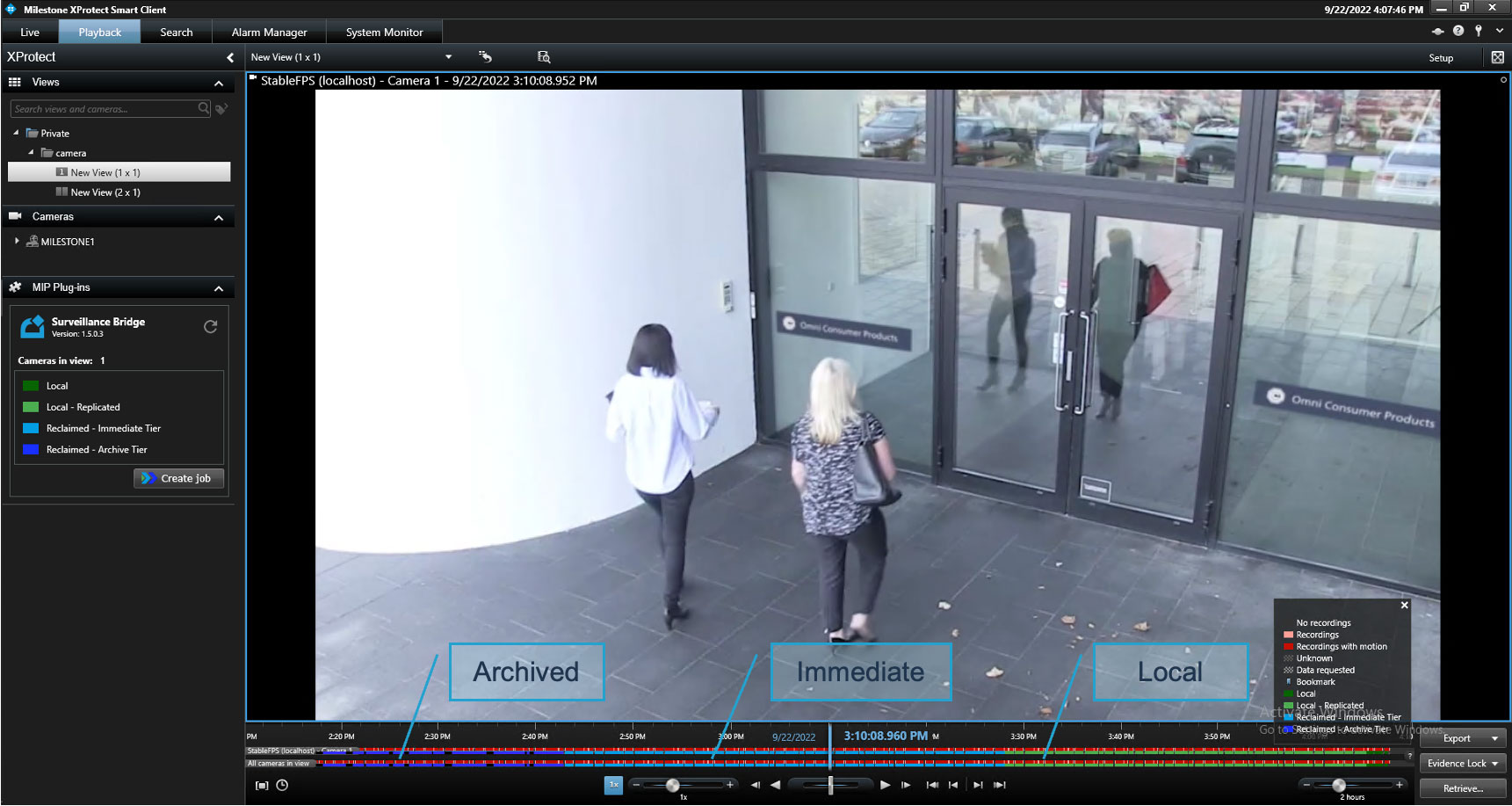
Video investigations are most effective when footage can be reviewed quickly and efficiently. Arcules-XProtect Playback Enhancements improve the experience of viewing Arcules video within XProtect through greater playback stability, smoother navigation, reduced buffering, and improved high-speed playback performance. These updates help operators move through recorded footage with less friction, spend less time waiting for video to load, and review more video in less time. By streamlining video playback workflows, security personnel can focus on identifying and responding to incidents rather than managing playback limitations.
These enhancements build on Arcules' commitment to delivering flexible, intelligent, and easy-to-manage cloud video security solutions. From protecting privacy and accelerating investigations to simplifying deployments and improving operational resilience, each capability is designed to help organizations meet evolving security needs while getting more value from their technology investments. Whether deployed as part of a pure cloud environment or alongside existing security infrastructure, Arcules continues to help organizations simplify operations, improve visibility, and respond to incidents with greater confidence.